
Team resource Β· about 40 minutes

    How we run social with AI, from first thought to approved post

    This is the short version for the team.

    It shows how ideas get caught, where they live, and how AI turns them into a weekly rhythm someone approves before it goes out.

    Your next useful post might start as a random thought while making dinner, a reactive idea sparked by a client's question, or a proactive discovery when AI pulls together past meetings, emails, and workshops.

    Doing it yourself, or handing it over?

    Every step is written so a VA or team member can follow it without you.

    Send it across and we email them the link, what it is for, what they will set up, and your Skool email to unlock it. Their ticks save to your membership, so you can see where it is up to.

    I’ll do it myself

    Member access

    Day 1 is open. The rest unlocks with your Skool email.

    Use the email address you signed up to Skool with, so your progress stays tied to your membership.

    Stage 1 of 4 Β· about 15 minutes

    Catch your ideas now, develop them later

    The biggest change to how we do content is giving ideas a home. Catch first. Developing comes later, when there is time and a clear head.

    1. 1.

      Random ideas arrive on the move. A thought on a walk, an analogy while cooking, or a "hang on" moment in the shower.

    2. 2.

      Reactive ideas arrive from other people. A brilliant client question, a podcast that sparks a view, or industry advice we disagree with.

    3. 3.

      Proactive ideas are found on purpose. AI looks for patterns across meetings, sent emails, old workshops, or interviews us about a topic.

    1

    Give your ideas a home in Buffer

    One place every raw idea lands.

    1. 1.

      Open Buffer. Buffer is free and has an Ideas board. It is the best starting place we know for social media management.

      Open Buffer in a new tab
    2. 2.

      Find the Ideas board. The full step by step setup lives in Telephone Your Biz Tools in AI, inside the Classroom.

    The tool opens in a new tab. Come back here to tick it off.
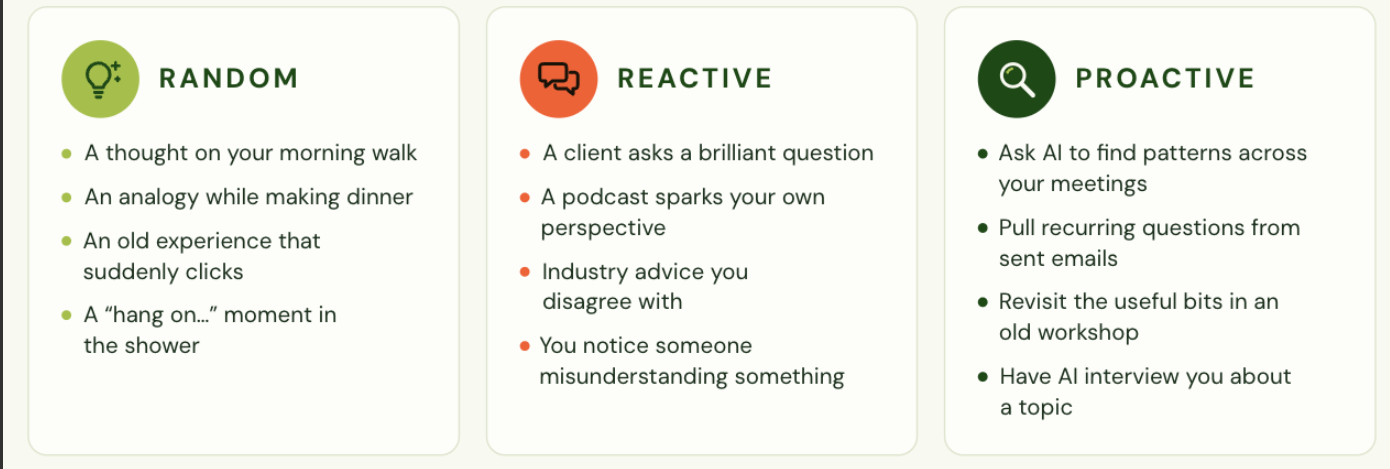
    The idea net: random, reactive, and proactive ideas all land in the same place.
    The idea net: random, reactive, and proactive ideas all land in the same place.

    The check

    You can see the Buffer Ideas board and add one test idea by hand.

    Stuck? Try this
    I can't connect Buffer to my AI tool
    Check the connectors or apps settings in ChatGPT or Claude. An @mention alone does not connect a tool.
    2

    Catch random ideas by walking and talking

    Thoughts go straight from your head into Buffer as drafts.

    1. 1.

      Talk it out. Open voice mode and say everything, unfiltered. Messy is fine.

    2. 2.

      Send it to Buffer. Finish with the prompt below so each thought lands as its own draft idea.

    Prompt
    Here are some thoughts I had while walking. Organise them into separate raw social media ideas, keep my wording, and don't turn them into finished posts. Add each one as a draft idea in @Buffer.

    The check

    Your thoughts appear in the Buffer Ideas board as separate draft ideas, in your own words.

    3

    Mine meeting transcripts for proactive ideas

    A weekly scheduled task that brings you ideas to keep, tweak, or bin.

    1. 1.

      Try the short version. Fill in the brackets with your meeting tool and time period.

    2. 2.

      Schedule the full version. Copy the Monday prompt below and save it as a scheduled task. It shows ideas for feedback before anything reaches Buffer.

    /Scheduled task: look at my meeting transcripts in [Zoom, Google Meet or Teams] from the last [7 days] and discern what would be potent social media ideas to develop. Present them to me for feedback, then push the ones I like into @Buffer.
    Prompt
    Every Monday at 8am, review my meeting transcripts from the past 7 days using my connected Zoom, Google Meet or Microsoft Teams tools. Mine them for potential social media gold, including interesting opinions, client questions, recurring problems, aha moments, stories, useful explanations and things I say that might seem obvious to me but valuable to my audience.
    
    Using what you know about my business, audience, brand voice and content strategy, synthesise the strongest 5–10 ideas. For each, show the original insight, why it's worth sharing, a suggested content angle and whether it suits TOF, MOF or BOF.
    
    Preserve my natural language and thinking, anonymise confidential details and don't invent stories or quotes. Present the ideas for my feedback first, with options to Keep, Tweak or Bin. Only push approved ideas into my connected @Buffer Ideas board, keeping them as raw ideas to develop later, not finished posts. If a connection or scheduled task isn't available, tell me rather than pretending it ran.

    The check

    The AI shows you 5 to 10 ideas, each with the original insight and a Keep, Tweak, or Bin choice, before anything goes to Buffer.

    Stuck? Try this
    It says it can't see my transcripts
    Connect Zoom, Google Meet, or Teams in your AI tool settings first, or paste one transcript in to test.

    End of Stage 1

    Stage 1 done.

    Ideas have a home, and a weekly task finds more for you.

    Ticked off 0/3

    • Give your ideas a home in Buffer, not done yet
    • Catch random ideas by walking and talking, not done yet
    • Mine meeting transcripts for proactive ideas, not done yet
    πŸ€– Stage 2

    Stage 2 of 4 Β· about 10 minutes

    Decide, then let a Coordinator skill do the remembering

    Before we write anything, decide who it is for, what it should lead to, and how it should sound. Then we put those decisions into a skill so nobody re-explains the business in every chat.

    Locked Β· 1 steps

    • Set up a custom AI Social Media Coordinator
    Enter your Skool email to unlock

    End of Stage 2

    Stage 2 done.

    The Coordinator holds our decisions, so every chat starts informed.

    Ticked off 0/1

    • Set up a custom AI Social Media Coordinator, not done yet
    πŸ—‚οΈ Stage 3

    Stage 3 of 4 Β· about 10 minutes

    Build a content bank and a rhythm you can repeat

    Once the Coordinator is in place, approved ideas become a bank of ready pieces. Then the rhythm decides what goes out, and when.

    Locked Β· 2 steps

    • Turn approved ideas into a content bank
    • Agree the weekly ratio and day order
    Enter your Skool email to unlock

    End of Stage 3

    Stage 3 done.

    There is a bank to draw from and a rhythm to follow.

    Ticked off 0/2

    • Turn approved ideas into a content bank, not done yet
    • Agree the weekly ratio and day order, not done yet
    βœ… Stage 4

    Stage 4 of 4 Β· about 5 minutes

    Ping the reviewer before anything goes out

    AI drafts, a person approves. A scheduled reminder keeps the review on time.

    Locked Β· 1 steps

    • Schedule the review ping
    Enter your Skool email to unlock

    End of Stage 4

    Stage 4 done.

    Every post has a human yes before it goes live.

    Ticked off 0/1

    • Schedule the review ping, not done yet
    Ready check

    You're ready if...

    Catch one idea today

    Open voice mode, talk through one thought, and send it to Buffer. That is the whole system starting.

    Open Buffer

    Something not working? Message us in the Club.